Monday, March 1, 2010

Good monitoring/alerting solution for san storage and vmware

One thing that our current monitoring solution solar winds orion was lacking was vmware and storage reporting. Solarwinds decided to fix this issue by acquiring a company called tek-tools. Right now they are two separate products however in the near future they will be fully integrated into a single pane of glass.

Below are some screenshots of the tek-tools product and they are pretty self explanitory. It can monitor and alert on the following, esx host cpu/memory/disk space etc, esx guest cpu/memory/disk space, datastore useage, datastore forecasting, san lun performance, just to name a few. Another thing that I am very pleased with the graphical information it can show me in my EMC Clarrion SAN (one thing navisphere reporting can't provide you with). This seems to do an excellent job of completing the circle for monitoring of your virtual environment and san storage, and once integrated into orion it will provide full monitoring of everything in your environment!


Thursday, February 4, 2010

Attach RDM to vsphere with Recoverpoint

If you need to attach a recoverpoint volume to a guest through RDM you MUST select physical access in recoverpoint if you don't want to shut down the guest. If you select virtual access you must power down the guest and then attach the disk.

1. enable physical access in recoverpoint
2. ensure that your esx hosts can see this lun by verifying in navisphere storage groups
3. rescan datastore
4. edit properties of the guest and add a physical disk, if you did everything correctly attach RDM should be available.
5. Select a drive letter on the windows server for this disk.


Thursday, December 3, 2009

Problem with Users running Windows Vista or windows 7 with CISCO NAC release 4.6.1

Here is a problem that my co-worker Mike Maron recently ran into along with the solution.

If you have users or guest desktops/laptops with windows vista or windows 7 installed that cannot access the network via NAC, it is due to a problem with windows User account Control. When this feature is enabled (it is by default), it doesn’t work properly because NAC requires Internet Explorer to run in elevated mode in order to release and renew IP addresses.

There are two workarounds to this issue

1. Right click IE and selecting run as administrator (this only works if the user has administrative rights to local PC) and then access the nac page. In many cases the user does not have administrative rights to the computer, so they can not run IE as admin, nor can they disabled user account control. http://www.cisco.com/en/US/docs/security/nac/appliance/release_notes/461/461rn.html#wp791975

2. There is also a way on the NAC appliance to bounce switch port via NAC instead of windows which will allow the PC to properly renew the IP address.

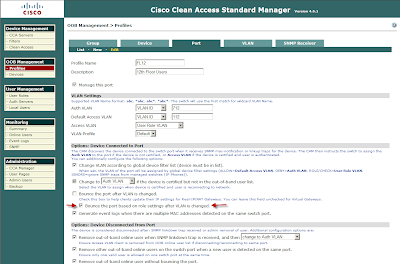
In OOB Management > Profiles>Port>choose profile to edit
Make sure the check box for Bounce the port based on role settings after VLAN is changed is checked off and update


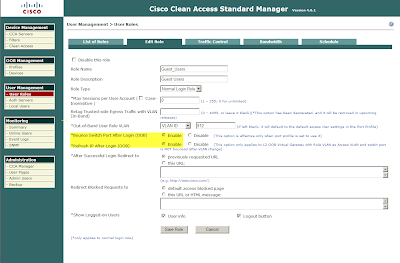
Then navigate to User Management>User roles>Choose role and edit
Make sure Bounce switch Port after login ( OOB ) is enabled as well as Refresh IP after Login( OOB ) and save role .
Tuesday, October 27, 2009

Replication Manager Problem

I had an RM job that suddenly stopped working with the following error
2009 10 27 13:13:03 EMCRM01 INFO:Replica 2009 10 27 13:13:03 created from application set xxxxxxxx_db_logs, job VPMPRODDBSQLCL_no_Verify by cerbadmin.
2009 10 27 13:13:03 EMCRM01 INFO:Starting RecoverPoint checkpoint of [application set:servername_db_logs / job: servername _no_Verify] at time 2009 10 27 13:13:03.
2009 10 27 13:13:03 EMCRM01 INFO:This operation can take a long time. Please be patient.
2009 10 27 13:10:53 servername 004052 WARNING:Unable to find Invista CLI path. If Invista instances are being used, install InvCLI into the default path: C:\Program Files\EMC\INVCLI\.
2009 10 27 13:10:53 servername 000600 ERROR:Storage device S:\Microsoft SQL Server\MSSQL.1\MSSQL\DATA\MSDBData.mdf could not be located on supported arrays. Please check if there are problems communicating with the storage arrays.
2009 10 27 13:10:53 servername 026051 ERROR:processGetStorageDetails - failed to write Storage Details.
2009 10 27 13:10:53 servername 026607 ERROR:An unexpected internal error occurred: rawMessage::getSessionId - null buffer
2009 10 27 13:10:53 servername 026607 ERROR:An unexpected internal error occurred: rawMessage::getRequestId - null buffer

The workaround to resolve this error is as follows.
Go into the hosts tab of Replication manager, right click on the host you are having a problem with, and select rediscover arrays. Then execute the job again and it should complete successfully now.


Monday, October 26, 2009

Rename Netapp Filer (useful for netapp to emc migration of NAS)

The following steps are useful to rename a netapp filer, in order to preserve name space when migrating from netapp to emc. Unfortunately DFS wansn't used before I started working here, so I had 4 netapp filer names hosting CIFS shares that I had to migrate to EMC Celerra. After using rainfinity to replicate the shares from netapp to EMC, I had to perform the following steps to steal the name for the netapp and reuse it on the Celerra.

  1. Connect to the filer by \\filername\c$\etc and copy the existing rc & hosts files as rc.old & hosts.old.
  2. Open up the original hosts file and search and replace for the filers name and replace with the new name
  3. Open up the original rc file, update the following hostname
  4. Update the NetBIOS name on the filer by typing "options cifs.netbios_aliases "
  5. Run the following on the filer you are renaming "CF disable" to disable the cluster, "CIFS Terminate" to terminate the cifs service.
  6. Remove the entry for the old filer name from Active Directory users and computers and from DNS
  7. Run Cifs Setup to add the filer back into Active directory and DNS with the new name
  8. Run "CF enable" to enable the cluster.
  9. Connect to the node that you failed over to and type "CF takeover" this will cause a reboot of the filer that you renamed
  10. Once the filer that you renamed is back & you will see a message saying giveback operation is now available
  11. run "cf giveback"

Tuesday, September 29, 2009

Problem Adding New Host to Replication manager

I ran into an interesting problem today when trying to connect a new host to Replication Manager. When I right clicked on the host and selected discover arrays I would get the following error (SymApi not present, but function "SymInquiry All" Invoked).


It turns out that windows 2003 servers that are 64 bit must have the Solutions Enabler 32 bit client on them. The 64 bit Solutions enabler client is ONLY for 64 bit 2008 servers. After uninstalling the 64 bit client from the 2003 servers and then installing the 32 bit client on them (no downtime is required by the way) I was still running into this issue. What I then had to do was the following:
  • Stop the RM service from the server that I was trying to add to RM
  • Go into the following directory C:\Program Files (x86)\EMC\rm\client\bin
  • Renamed symapi_db_emcrm_client.db to symapi_db_emcrm_client.db.old
  • Restart the rm client services.
  • Right click the host in RM and select discover arrays, this error should now be resolved.

Thursday, September 24, 2009

How To Create MetaLun on EMC Clariion

Here are the steps invovled in creating a MetaLun on an EMC Clariion CX4. The steps below show creating 4 luns of size 6,400 MB which are then expanded into 1 lun of 25 gigs. Photos 1 and 2 will need to be performed 4 times in order to create all 4 luns, and I set these up as follows:
LUN 3924 Raid Group 27 raid 1+0 LUN ID 3924 6,400 MB
LUN 3925 Raid Group 26 raid 1+0 LUN ID 3924 6,400 MB
LUN 3926 Raid Group 25 raid 1+0 LUN ID 3924 6,400 MB
LUN 131 Raid Group 24 raid 1+0 LUN ID 3924 6,400 MB
I then expanded lun 131 to the full capacity of 25 gigs by striping it across the 3 other luns.